Automating CSS versioning in staging through GitHub Actions
While setting up a staging environment in a new hosting platform, I ran into an issue where static assets were aggressively cached with no straightforward way to invalidate them. This made staging deploys unreliable and validating changes slow.
I could have spent hours fighting with cache headers and purge APIs, but there’s a simpler approach. Rather than fighting the cache, I leaned into patterns that avoid invalidation entirely and make staging behaviour explicit and predictable.
The Problem
This staging environment was behaving badly:
- Static assets were cached aggressively
- Cache purging is unavailable
- Deploys appear as “successful” but changes were not visible
So I was stuck with a cache that I couldn’t purge and changes I needed to validate somewhere other than my local machine. So I figured it was time to version the styling scripts.
Versioned static assets
One reliable way to bypass aggressive caching is to change the asset URL on every deploy.
Static assets are referenced with a deploy-specific version, in my case I went for short git SHA.
<link rel="stylesheet" href="/static/css/base.css?v=6ea4bbe">
This was enough to fix the problem:
- CDNs cache by URL.
- A new URL guarantees a cache miss.
- No reliance on purge APIs or cache headers.
- Simple, deterministic behaviour.
This approach works well for staging, where correctness matters more than caching efficiency. Then my next challenge was: how to get this into my deployment without me manually editing the URLs every single time?
Label-gated staging deploys
I can’t remember to update URLs manually every single time, so instead of suffering every time my CSS wouldn’t update accordingly, I adjusted my code and added a step in my GitHub Actions to take care of this for me.
Since I’m the sole developer on this project, my staging deploys are explicitly controlled using pull request labels.
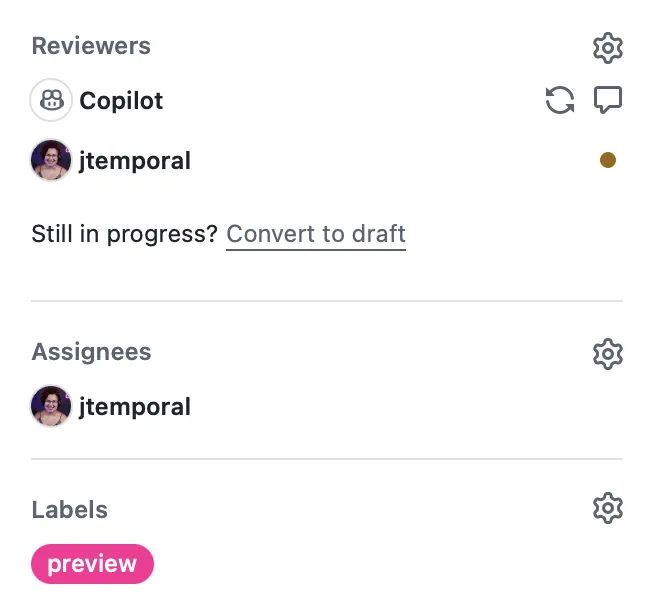
A pull request is deployed to staging only when the preview is applied.
GitHub Actions
In case you want to replicate this for yourself, here’s how to do it. The steps are pretty simple:
- Run your tests;
- If tests pass deploy the app to the staging environment
- Make a comment on your PR so you know the version of the CSS that should be live
- Enjoy QA-ing your staged deployment
First the setup for your action:
name: Run tests and stage changes

on:
  pull_request:
    types:
      - opened
      - synchronize
      - reopened
      - labeled
      - unlabeled

jobs:
# ...
This names the action and tells it which Pull Requests to look at, in my case all of them.
1. Tests running
I want to make sure that all pull requests pass my test suite, so the first job checks out the pull request, installs the dependencies and creates necessary files, then runs the tests:
# ...

jobs:
  test:
    runs-on: ubuntu-latest

    steps:
      - name: Checkout PR branch
        uses: actions/checkout@v4

      - name: Install uv
        uses: astral-sh/setup-uv@v7

      - name: Install dependencies
        run: uv sync --extra dev

      - name: Setup test environment
        run: cp .env.example .env

      - name: Run tests
        run: uv run pytest

  deploy-staging:
  # ...
This guarantees code quality in all pull requests before I even consider deployment.
With a successful test we can move on to deployment.
2. Stage the deployment
The deployment job only needs to run when the preview label is included.
Then a neat trick: you can get the SHA for the deployment with github.sha and write it out to a file, in this case .deploy_sha and once the code is sent to the cloud it can use that file to read the information.
jobs:
  test:
    # ...

  deploy-staging:
    # Only run after tests pass
    needs: test
    if: contains(github.event.pull_request.labels.*.name, 'preview')

    runs-on: ubuntu-latest

    permissions:
      contents: read
      pull-requests: write

    steps:
      - name: Checkout PR branch
        uses: actions/checkout@v4

      - name: Install uv
        uses: astral-sh/setup-uv@v7

      - name: Set deploy SHA
        run: echo "$" | cut -c1-7 > .deploy_sha

      - name: Deploy to staging
        env:
          CLOUD_TOKEN: $
          CLOUD_APP_ID: $
        run: # your deploy command here

      # ...
My code also needed to account for that. So first I created a function in my FastAPI app to grab the first few characters of the SHA from either the environment variable or the .deploy_sha file. I also set a fall back to dev.
# Deploy SHA for cache busting - check env var first, then file, fallback to "dev"
def get_deploy_sha():
    """Get deploy SHA from environment or .deploy_sha file."""
    sha = os.getenv("DEPLOY_SHA")
    if sha:
        return sha[:7]

    # Try reading from file (created during CI/CD deploy)
    try:
        with open(".deploy_sha", "r") as f:
            return f.read().strip()
    except FileNotFoundError:
        return "dev"

# Automatically make the deploy_sha available in all templates
templates.env.globals["deploy_sha"] = get_deploy_sha()
The environment variable is used in production which normally doesn’t change unless I see some weird caching I’m not expecting to, whereas while developing locally the fallback takes action and in staging we use the file.
Finally the HTML template looks like this:
<link rel="stylesheet" href="/static/css/base.css?v=">
Since we pass the deploy_sha automatically as part of the globals variables for templates, any page will have the information they need when the application is being built.
3. Get a comment
Finally, I wanted to get a comment I can see both:
- That the deployment is live
- The hash I should look for in case I notice some discrepancies between what I’m seeing and the deployment
To this I added a final step to the deploy-staging job with the following code:
# ...
jobs:
  test:
    # ...

  deploy-staging:
    # ...
    steps:
      # ...

      - name: Comment staging URL on PR
        uses: actions/github-script@v7
        with:
          script: |
            const sha = '$'.substring(0, 7);
            const marker = '<!-- staging-deploy -->';
            const body = `${marker}\n🚀 **Staging deploy complete**\n\nPreview: $\n\nCommit: \`${sha}\``;

            // Find existing comment
            const { data: comments } = await github.rest.issues.listComments({
              owner: context.repo.owner,
              repo: context.repo.repo,
              issue_number: context.issue.number,
            });

            const existing = comments.find(c => c.body.includes(marker));

            if (existing) {
              await github.rest.issues.updateComment({
                owner: context.repo.owner,
                repo: context.repo.repo,
                comment_id: existing.id,
                body: body,
              });
            } else {
              await github.rest.issues.createComment({
                owner: context.repo.owner,
                repo: context.repo.repo,
                issue_number: context.issue.number,
                body: body,
              });
            }
Since I also didn’t want every new commit to generate a new comment, I used an HTML comment to mark the message:
const marker = '<!-- staging-deploy -->';
Since comments render Markdown the HTML shows up in edit mode but gets hidden when displayed.
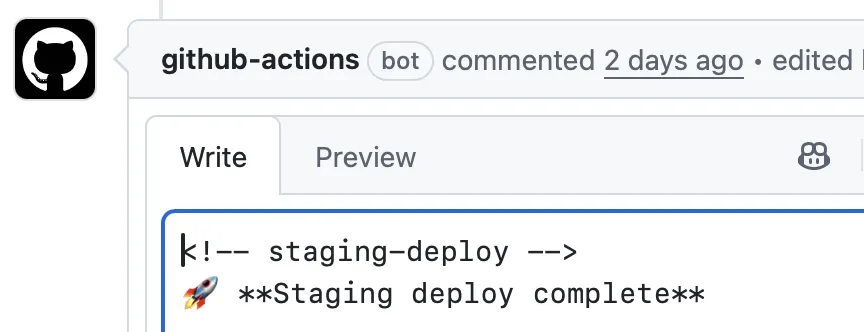
And this is what that looks like as the final step of the deploy-staging is completed:
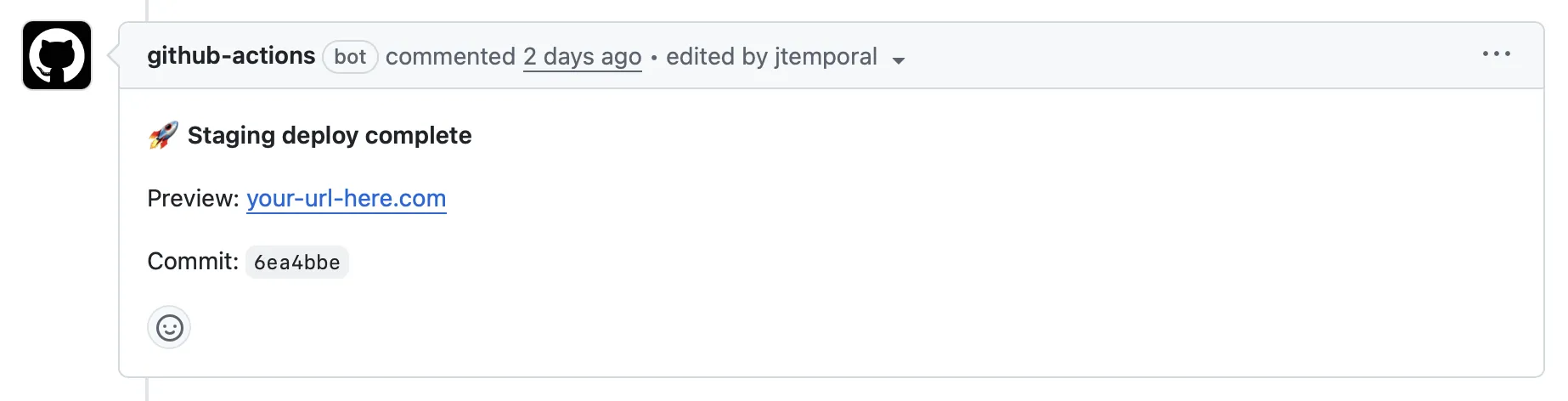
Trade-offs of this approach
This gave me full control over which pull request is staged and my staging represents “currently under review” making it easier for me to even QA the changes myself.
The only downside from this approach is that I can’t have multiple ephemeral per-pull-request environments since I can only make one PR deployment at a time but that works well for my development workflow.
The goal is clarity and control, not maximum automation.
Conclusion
Versioned static assets and label-gated deploys solved my staging cache problem. Now CSS files get a git SHA in the URL, GitHub Actions handles deployments when I apply the preview label, and I always know which version is live. No cache invalidation needed.