Today’s tip was inspired by this tweet right here:
como ele funciona a respeito dos pacotes instalados via pip? tem um pip pra cada versão? os pacotes ficam disponíveis pra múltiplas versões?
— luciano ratamero (@lucianoratamero) 31 de dezembro de 2017
So if you already installed pyenv and now want to know a little bit more about how it works just like Luciano did, here you go…
Pip
For those who don’t know what pip is, it’s the recommended tool for installing Python packages.
Where do pyenv versions go?
Inside the pyenv folder, there’s a directory called versions and that’s where the versions you install using the pyenv install command live. On my machine I have three Python versions installed:
|
|
|
|
|
Pyenv and Pip
Each new Python version you install using pyenv already comes with its own pip. Take a look:
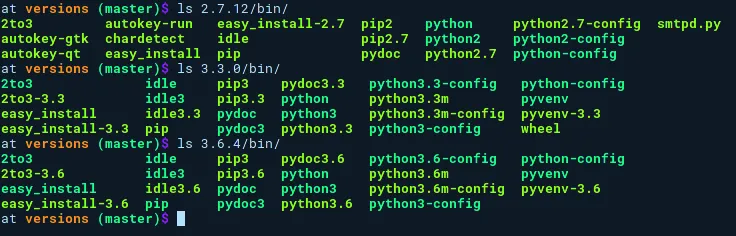
List of installed packages in each version
Now, if you set a Python version using pyenv and install a package using pip, what happens? Does that package become available to the other versions?
Quick answer: no. A package installed in one version doesn’t become available in another version.
Let’s take a look. I’ll use the Caipyra package as an example. Before installing, we have:
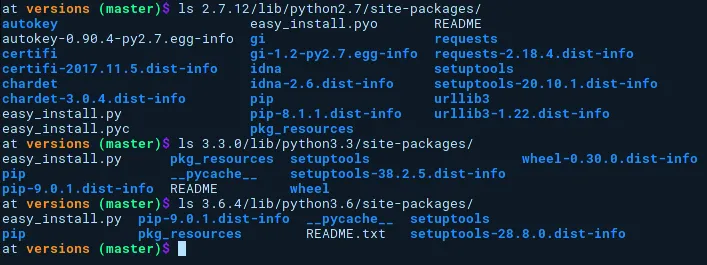
List of installed packages in each version
Installing caipyra on version 3.3.0:
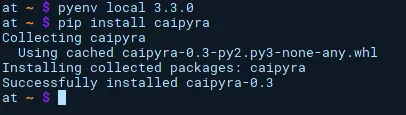
Installing the Caipyra package on version `3.3.0`
Listing the packages installed in each version again:
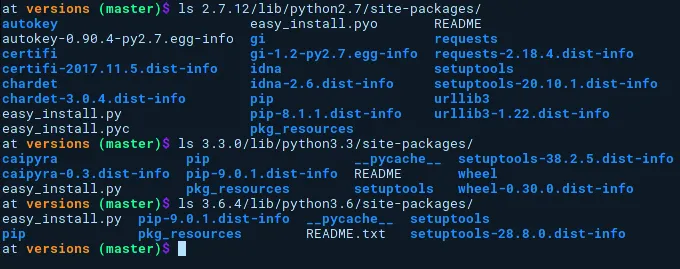
List of installed packages in each version
And finally the test to see if the package is available (or not) for other versions:
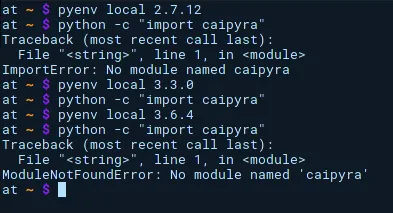
Running `import caipyra` on every version
On version 2.7.12 and on version 3.6.4, Python yells ModuleNotFoundErrror. This error is characteristic of when the package isn’t installed.
Cool right? So get ready, aim, and install different packages on each Python version 😜
Links
- The first part of this tutorial can be found here and shows how to install pyenv.
- To understand how pyenv works under the hood, take a peek at the How it Works section of the project’s README.
Special thanks
Thanks Luciano Ratamero for the questions that gave me the idea for this other post 😉